Memory used 15.7 of 16 GB
The spinning wheel in the middle of an edit
Final Cut, Chrome and an export are all open. Memory runs out, so macOS starts using the drive as extra memory. Every click takes seconds.

Coming early 2027 · First 100 buyers get half price
Headroom watches memory, heat and storage, and shows you what's safe to clear. Every file comes with a plain reason. Nothing is deleted without you.
Free to join. By joining, you agree to get emails about Headroom, including before the first 100 spots open. Unsubscribe any time. Privacy policy

The problem
It usually happens with an export running and a client waiting.
Memory used 15.7 of 16 GB
Final Cut, Chrome and an export are all open. Memory runs out, so macOS starts using the drive as extra memory. Every click takes seconds.
Your disk is almost full.
The export stops halfway. You have a deadline and 20 GB left. Now you need to find space quickly.
Downloads 160 GB
Downloads holds old shoots next to this week's client work. Finder shows you sizes. It doesn't show you what's safe to remove.
Is this on the backup drive?
You can't easily tell which folders have a copy on your backup drive. So you leave them all, and the disk stays full.
Why it keeps happening
Many show a large "junk" total and ask you to trust it. Some delete files outright, so there's nothing in the Bin to bring back.
You sort by size and open folder after folder. It takes hours. Finder still can't tell you what's on your backup drive.
They show charts of memory and disk use. They don't tell you which app to close or which folder can go.
How Headroom fixes it
You make every choice. Headroom looks through your Mac and explains what it finds.
1Check
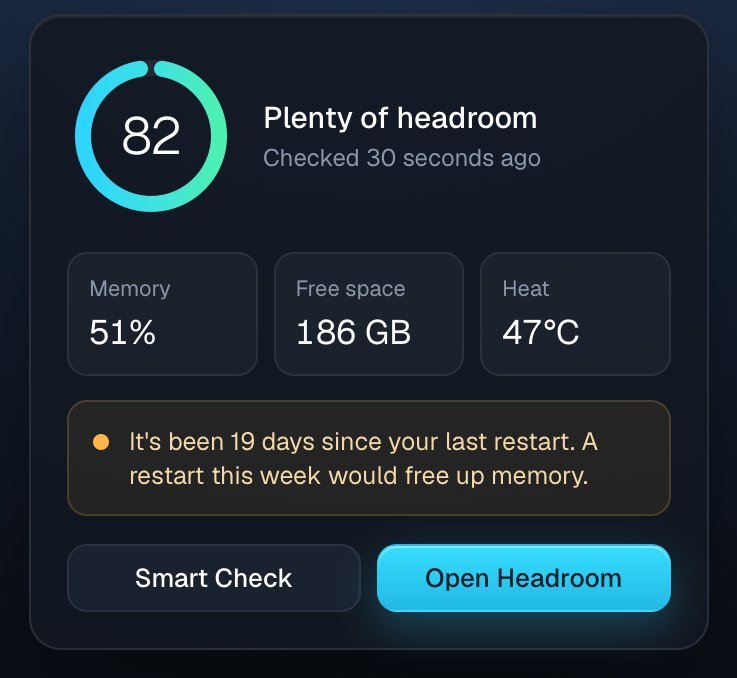
Headroom reads memory, heat and storage, and gives your Mac one simple score. When memory runs low and macOS starts using the drive instead, it tells you in plain words. It also shows which app to close.
It's in the menu bar, one click away.
2Review
It looks through Downloads, Movies, Documents and your Desktop. It finds big files and folders you haven't opened in months. A shoot folder full of RAW files shows up as one item.
Each item says why it's listed. For example: "Not opened in 14 months. A copy is on your backup drive."
3Clear
Nothing is deleted. You can put anything back from the Bin, and you empty it yourself when you're sure.
Headroom then shows how much space you got back.
Why it's safe
Headroom only suggests. You decide, and you can undo any choice until you empty the Bin.
Plug in your backup drive and Headroom tags each old folder. Folders with a matching copy say "On your backup drive". Folders without one stay unticked.
We haven't found another Mac cleaner that checks for a backup copy.
Folders without a backup are left unticked.
Headroom never deletes a file. Ticked items move to the Bin, and you can put them back from Finder.
Photos, Lightroom catalogues and Final Cut libraries are never offered. Neither is any folder that holds one.
Every file and folder shows its size, its age and why it's listed. You can check each one before you tick it.
Headroom runs on your Mac. Your files and folder names are never uploaded anywhere.
Tested on a real Mac
24GB
Free space, according to macOS
205GB
Found by Smart Check, mostly in 119 old folders
27sec
To look through 84,448 files
Checked on 16 November 2026. Nothing was moved during the check. Your result will depend on what's on your Mac.
I'm Koome, a video producer in Australia. My MacBook Pro kept filling up with footage. In October it froze while three 4K videos were exporting at once.
So I built a tool for my own Mac. It told me what was safe to clear, and it checked my backup drive first. Headroom is that tool, being rebuilt to work on any Mac.
Koome, founder of Headroom
Who it's for
Footage, renders and Final Cut libraries. One shoot can take 50 to 200 GB.
RAW files and Lightroom catalogues. Old shoots often stay in Downloads for years.
Large design files, mockups and exports, spread across the Desktop and Downloads.
A few Macs with client work on each one, and backup drives that need checking.
Launch offer
Join the waitlist to get half price. We'll email you before the 100 spots open.
First 100 buyers Waitlist only
Half the regular price of A$99
Regular price
A$99once
Yearly plan
A$39a year
Prices are in Australian dollars and include GST. Version 2 will be a paid upgrade at half price for people who own version 1. 30-day refund.
Before you join
No. It moves the files you tick to the Bin. Nothing is gone until you empty the Bin yourself, and you can put anything back from Finder.
That's what it was built for. Photos, Lightroom catalogues and Final Cut libraries are never offered. Folders without a copy on your backup drive are left unticked. Every item shows why it's listed.
It's being built for macOS 13 Ventura or later, on Apple silicon and Intel Macs. It works with any external backup drive.
No. Headroom runs on your Mac. Your files and folder names never leave it.
macOS keeps Downloads, Documents and the Desktop private until you let an app see them. Headroom needs to see them to measure them. It shows you where to switch this on.
No. You pay once and every version 1 update is included. If you'd rather pay less up front, there's a yearly plan at A$39 that includes every update and upgrade while it's active.
Yes. If Headroom isn't right for you, email us within 30 days of buying for a full refund. Read the refund policy.
One licence covers up to 3 Macs that you or your business use. You can move it to another Mac whenever you like.
We use your first name and email to send you news about Headroom. We don't sell or share them. Every email has an unsubscribe link. Read the privacy policy.
CleanMyMac is a large all-in-one cleaning app from MacPaw. Headroom does fewer things, for people with big media files.
It checks your backup drive before it suggests a folder. It only ever moves files to the Bin. It also tells you when memory is running low. If you want a full suite of tools, CleanMyMac may suit you better.
Early 2027. People on the waitlist hear first, and the first 100 buyers pay half price.
The first 100 buyers pay half price on the A$99 regular price. It's free to join, and you can unsubscribe any time.
By joining, you agree to get emails about Headroom. Unsubscribe any time. Privacy policy